In the previous part, we learned how to use POST requests and request bodies to send data to a FastAPI application and create a new patient.
But creating resources is only one part of building a complete API.
What if a patient’s information changes?
What if a record needs to be removed?
This is where the
PUTandDELETEHTTP methods become useful.
In this part, we’ll extend our Patient Management System by adding endpoints to update existing patients and delete patient records.
We’ll also see how Pydantic can be used to define an update model, how FastAPI handles path parameters and request bodies together, and how the different HTTP methods work together to form the basic CRUD operations of an API.
Overview
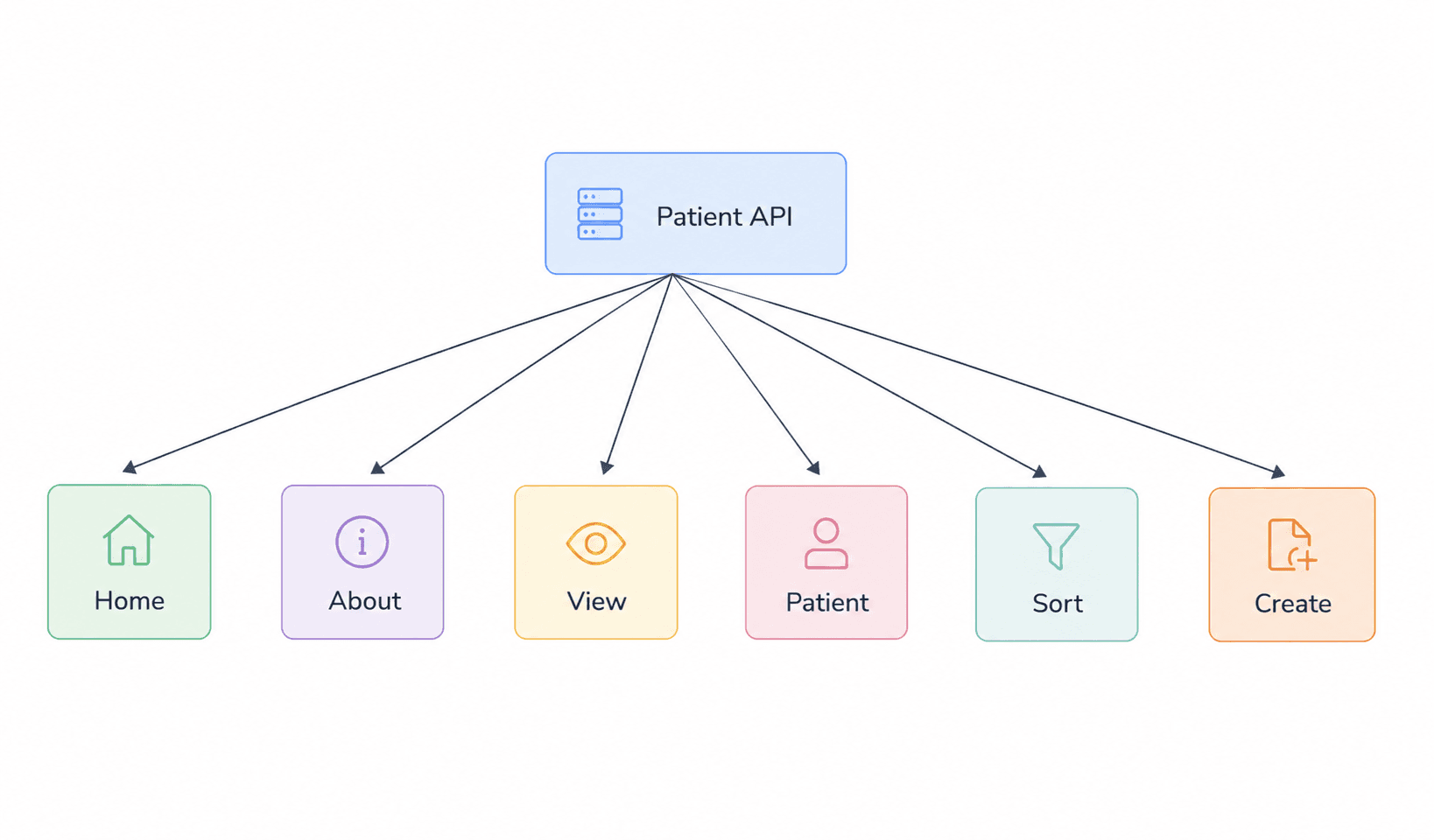
Project Progress
In the previous part, we added the Create operation using a POST request. Our Patient Management System can now retrieve patient information and create new patient records.
In this part, we’ll add the Edit/Update and Delete operations, completing the core CRUD functionality of the API.
PUT Requests and Update Endpoint
The PUT method is an HTTP method used to update or modify an existing resource on the server.
In our Patient Management System, we use a PUT request when we want to update information belonging to an existing patient.
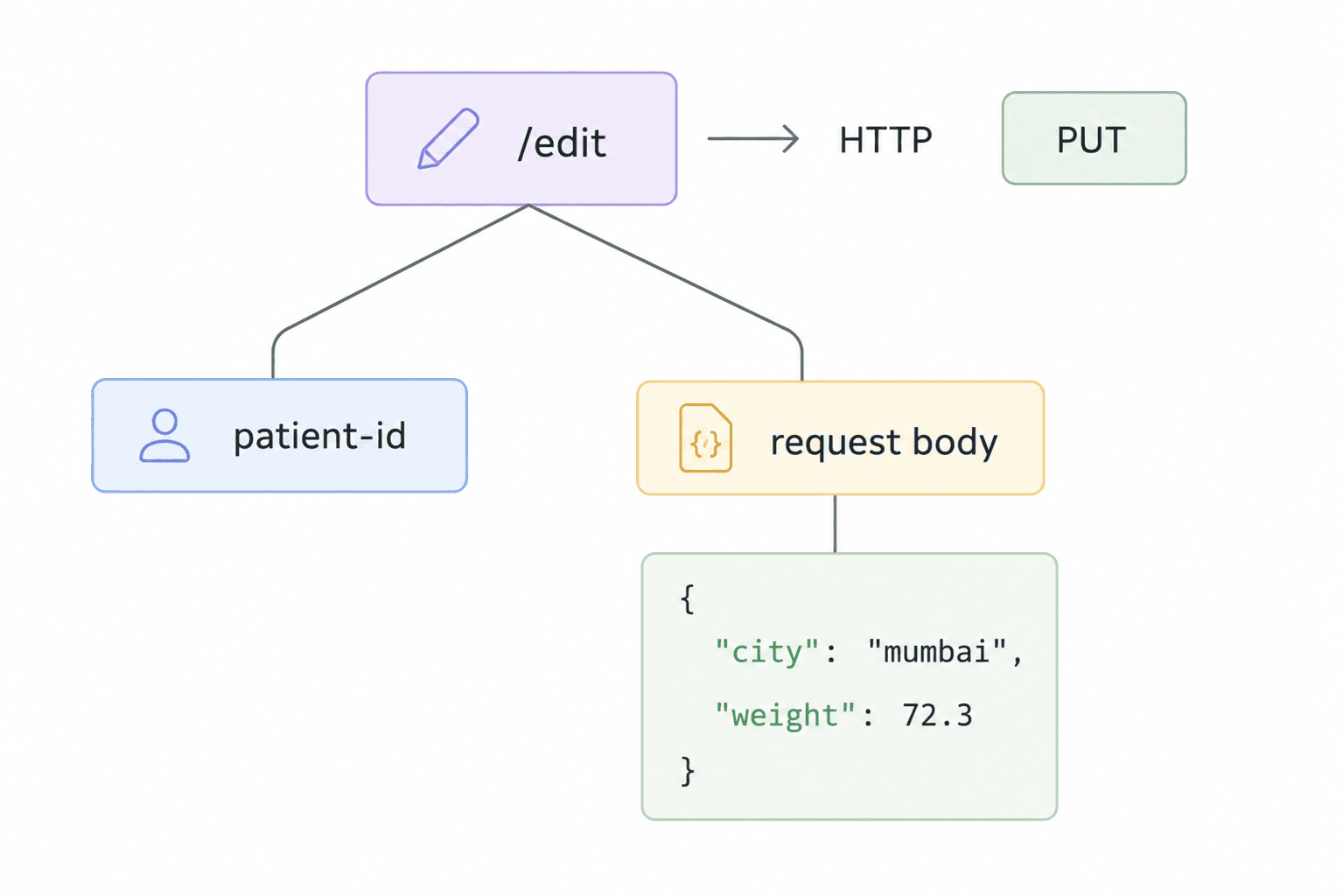
For example, if a patient’s city or weight changes, the client can send an update request to an endpoint such as:
PUT /edit/P001Here, P001 identifies the patient that needs to be updated, while the request body contains the information that should be changed.
Our FastAPI application defines the update endpoint as:
@app.put('/edit/{patient_id}')
def update_patient(patient_id: str, patient_update: PatientUpdate):
    ...
Here:
@app.put('/edit/{patient_id}')defines thePUTendpoint.{patient_id}is a path parameter used to identify the patient to update.patient_updateis the request body containing the fields to update.
FastAPI passes the request body through the PatientUpdate Pydantic model, which validates the incoming update data.
For example, a client could send:
PUT /edit/P001with the following request body:
{
  "city": "Mumbai",
  "weight": 72.3
}
Here, P001 identifies the patient, while city and weight are the values being updated.
Before updating the record, the API loads the existing patient data and checks whether the requested patient exists:
data = load_data()

if patient_id not in data:
    raise HTTPException(status_code=404, detail='Patient not found')
If the patient does not exist, the API returns a 404 Not Found response. Otherwise, it continues with the update process.
The basic flow is:
Client → PUT Request → Patient ID + Request Body → Validation → Find Patient → Update Data
The important difference from the POST request we used in Part 6 is that POST creates a new resource, while PUT modifies an existing resource.
PatientUpdate Model
When updating an existing patient, we may not want to send all of the patient’s information again.
For example, if only the patient’s city and weight need to be changed, the client should be able to send only those fields.
To handle this, our application defines a separate Pydantic model called PatientUpdate:
class PatientUpdate(BaseModel):
    name: Annotated[Optional[str], Field(default=None)]
    city: Annotated[Optional[str], Field(default=None)]
    age: Annotated[Optional[int], Field(default=None, gt=0)]
    gender: Annotated[Optional[Literal['male', 'female']], Field(default=None)]
    height: Annotated[Optional[float], Field(default=None, gt=0)]
    weight: Annotated[Optional[float], Field(default=None, gt=0)]
The model makes the update fields optional, allowing the client to provide only the information that needs to be changed. At the same time, fields such as age, height, and weight still have validation rules when they are provided.
For example, a client can send:
{
  "city": "Mumbai",
  "weight": 72
}
There is no need to send the patient’s name, age, height, or other unchanged fields.
The update endpoint receives this model as its request body:
@app.put('/edit/{patient_id}')
def update_patient(patient_id: str, patient_update: PatientUpdate):
    ...
Here, patient_update contains only the fields supplied by the client.
Later in the update process, the application uses:
updated_patient_info = patient_update.model_dump(exclude_unset=True)exclude_unset=True ensures that only fields actually provided in the request are included in the update. This prevents unspecified fields from overwriting the existing patient information.
So the idea is simple:
PatientUpdate Model → Accept Only Fields to Change → Validate Them → Update Existing Patient
This separate model makes the update endpoint more flexible while keeping the incoming data validated through Pydantic.
Updating Patient Data
Once we have identified the patient and validated the fields that need to be changed, we can update the existing patient record.
The update endpoint first loads the existing patient data:
data = load_data()It then checks whether the requested patient exists:
if patient_id not in data:
    raise HTTPException(status_code=404, detail='Patient not found')
If the patient exists, the current patient information is retrieved:
existing_patient_info = data[patient_id]Next, we convert the PatientUpdate model into a dictionary and use exclude_unset=True so that only the fields provided by the client are included:
updated_patient_info = patient_update.model_dump(exclude_unset=True)The provided values are then applied to the existing patient record:
for key, value in updated_patient_info.items():
    existing_patient_info[key] = value
The updated patient information is then passed through the Patient Pydantic model again:
existing_patient_info['id'] = patient_id

patient_pydandic_obj = Patient(**existing_patient_info)

existing_patient_info = patient_pydandic_obj.model_dump(exclude='id')
This step is important because the Patient model contains the computed bmi and verdict fields. Recreating the Pydantic model allows those computed values to be recalculated using the updated patient information.
Finally, the updated record is placed back into the data and saved:
data[patient_id] = existing_patient_info

save_data(data)
The complete update process is:
Find Patient → Get Provided Fields → Update Existing Data → Revalidate with Patient → Recalculate BMI & Verdict → Save Data
This approach allows the client to update only the fields that have changed while keeping the rest of the patient’s existing information intact.
Recalculating BMI and Verdict
When a patient’s height or weight is updated, the patient’s calculated BMI and corresponding verdict should also reflect the new values.
In our application, the Patient model already contains two computed fields:
@computed_field
@property
def bmi(self) -> float:
    bmi = round(self.weight/(self.height**2), 2)
    return bmi

@computed_field
@property
def verdict(self) -> str:
    if self.bmi < 18.5:
        return 'Underweight'
    elif self.bmi < 25:
        return 'Normal'
    elif self.bmi < 30:
        return 'Normal'
    else:
        return 'Obese'
The BMI is calculated from the patient’s weight and height, while the verdict is determined from the calculated BMI.
After applying the requested updates, the application adds the patient ID back to the updated data and creates a new Patient object:
existing_patient_info['id'] = patient_id

patient_pydandic_obj = Patient(**existing_patient_info)
When the Patient model is created again, its computed fields are evaluated using the updated height and weight.
The updated Pydantic object is then converted back into a dictionary:
existing_patient_info = patient_pydandic_obj.model_dump(exclude='id')For example, if a patient’s weight changes from 68 kg to 72 kg while their height remains 1.72 m, the BMI is recalculated using the updated values.
So the update flow becomes:
Update Height/Weight → Create New Patient Model → Recalculate BMI → Recalculate Verdict → Convert to Dictionary → Save Data
This ensures that the stored BMI and verdict stay synchronized with the patient’s updated information.
DELETE Requests and Delete Endpoint
The DELETE method is an HTTP method used to remove an existing resource from the server.
In our Patient Management System, we use a DELETE request when we want to remove an existing patient record.
Our FastAPI application defines the delete endpoint as:
@app.delete('/delete/{patient_id}')
def delete_patient(patient_id: str):
    ...
Here:
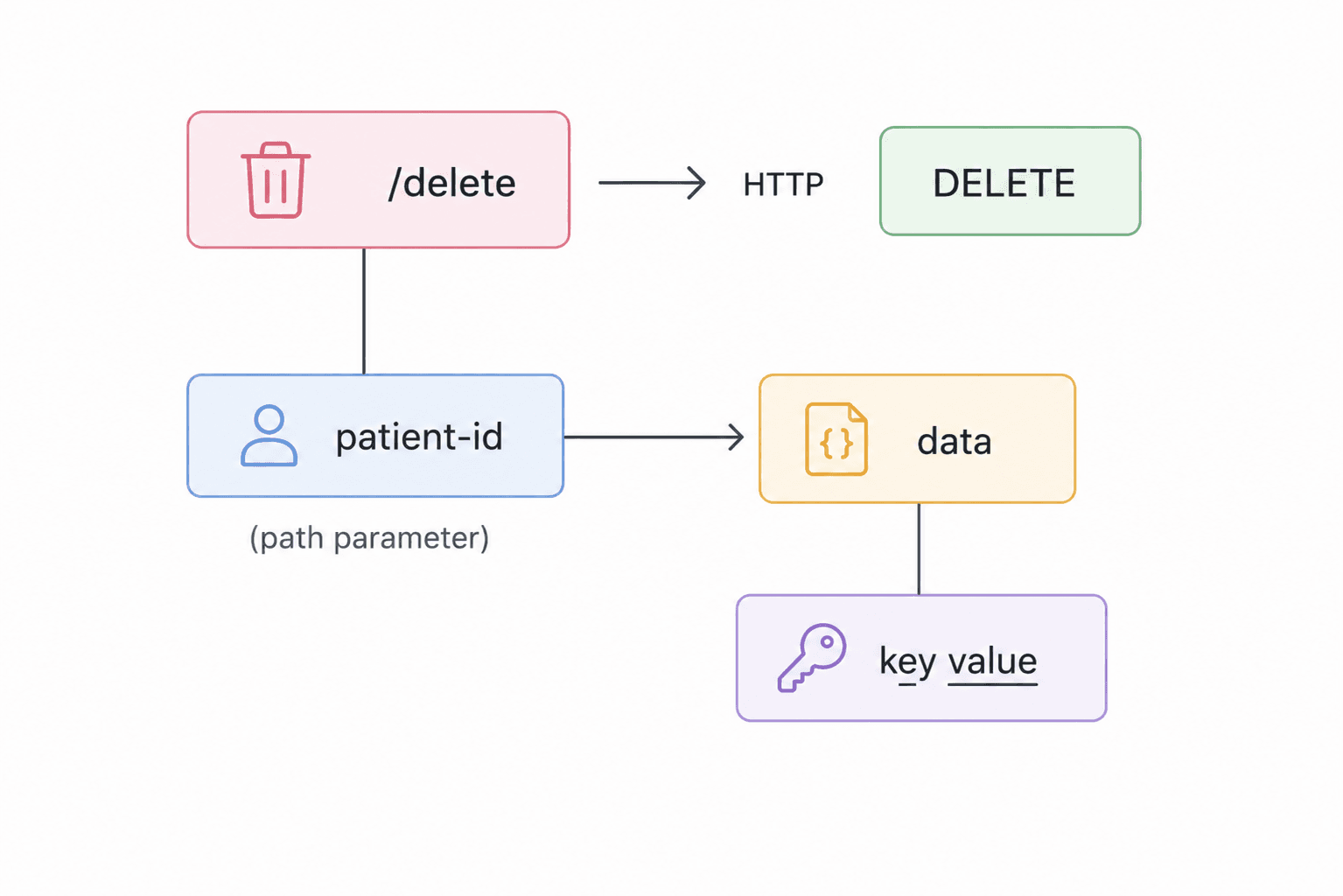
@app.delete('/delete/{patient_id}')tells FastAPI to handleDELETErequests.{patient_id}is a path parameter used to identify the patient that should be deleted.patient_id: strreceives the patient ID inside the function.
For example, a client can send:
DELETE /delete/P001Here, P001 identifies the patient record that should be removed.
The API first loads the existing patient data and checks whether the requested patient exists:
data = load_data()

if patient_id not in data:
    raise HTTPException(status_code=404, detail='Patient not found')
If the patient does not exist, the API returns a 404 Not Found response. Otherwise, the patient record is removed:
del data[patient_id]After deleting the record, the updated data is saved back to patients.json:
save_data(data)Finally, the API returns a successful response:
return JSONResponse(
    status_code=200,
    content={'message': 'patient deleted'}
)
The basic flow is:
Client → DELETE Request → Patient ID → Check Patient → Delete Record → Save Data → 200 OK
Unlike POST, which creates a resource, and PUT, which updates an existing resource, DELETE removes an existing resource.
Handling Patient Not Found
When a client tries to update or delete a patient, the requested patient_id may not exist in the data.
Our API handles this situation by checking whether the patient ID is present before performing the operation.
For the DELETE endpoint, the application checks:
data = load_data()

if patient_id not in data:
    raise HTTPException(
        status_code=404,
        detail='Patient not found'
    )
If the patient ID does not exist, HTTPException stops the operation and FastAPI returns a 404 Not Found response.
For example, if the client sends:
DELETE /delete/P999and P999 is not present in patients.json, the API returns:
{
  "detail": "Patient not found"
}
with the status code:
404 Not Found
The same validation is also used in the PUT endpoint before attempting to update a patient.
This prevents the application from trying to update or delete a record that does not exist.
The flow is:
Request → Check Patient ID → Patient Exists?
- Yes → Continue with the update or delete operation.
- No → Return
404 Not Found.
Handling missing resources this way gives the API a clear and predictable error response instead of allowing the operation to proceed with invalid data.
Complete CRUD Flow
At this point, our Patient Management System supports the four basic CRUD operations: Create, Read, Update, and Delete.
CRUD represents the four fundamental operations that an API typically performs on resources.
1. Create — POST
The POST method is used to create a new patient.
POST /createThe patient data is sent through the request body and validated using the Patient Pydantic model. If the patient does not already exist, the record is added to the data and saved.
2. Read — GET
The GET method is used to retrieve existing patient information.
For example:
GET /view
GET /patient/{patient_id}
The /view endpoint returns the available patient data, while /patient/{patient_id} retrieves a specific patient using the patient ID.
3. Update — PUT
The PUT method is used to modify an existing patient.
PUT /edit/{patient_id}The patient ID identifies the record, while the PatientUpdate request body contains the fields that need to be changed. The updated information is then validated again through the Patient model before being saved.
4. Delete — DELETE
The DELETE method is used to remove an existing patient.
DELETE /delete/{patient_id}The API checks whether the patient exists, removes the record, saves the updated data, and returns a successful response.
CRUD Overview
- Create →
POST /create→ Create a patient - Read →
GET /view→ View patients - Update →
PUT /edit/{patient_id}→ Update a patient - Delete →
DELETE /delete/{patient_id}→ Delete a patient
Together, these operations provide the basic functionality needed to manage patient records through an API.
The overall CRUD flow can be summarized as:
              Patient Management System
                         │
          ┌──────────────┼──────────────┐
          │              │              │
        CREATE          READ          UPDATE
         POST            GET            PUT
          │              │              │
          └──────────────┼──────────────┘
                         │
                       DELETE
                       DELETE
With GET, POST, PUT, and DELETE working together, our FastAPI application now supports the core lifecycle of a patient resource: creating, retrieving, modifying, and removing data.
Complete Code Example:
import json
from fastapi import FastAPI, Path, HTTPException, Query
from fastapi.responses import JSONResponse
from pydantic import BaseModel, Field, computed_field
from typing import Annotated, Literal, Optional

app = FastAPI()

class Patient(BaseModel):

    id: Annotated[str, Field(..., description='ID of the patient', examples=['P001'])]
    name: Annotated[str, Field(..., description='Name of the patient')]
    city: Annotated[str, Field(..., description='City where the patient is living')]
    age: Annotated[int, Field(..., gt=0, lt=120, description='Age of the patient')]
    gender: Annotated[Literal['male', 'female', 'others'], Field(..., description='Gender of the patient')]
    height: Annotated[float, Field(..., gt=0, description='Height of the patient in mtrs')]
    weight: Annotated[float, Field(..., gt=0, description='Weight of the patient in kgs')]

    @computed_field
    @property
    def bmi(self) -> float:
        bmi = round(self.weight/(self.height**2),2)
        return bmi

    @computed_field
    @property
    def verdict(self) -> str:

        if self.bmi < 18.5:
            return 'Underweight'
        elif self.bmi < 25:
            return 'Normal'
        elif self.bmi < 30:
            return 'Normal'
        else:
            return 'Obese'

class PatientUpdate(BaseModel):
    name: Annotated[Optional[str], Field(default=None)]
    city: Annotated[Optional[str], Field(default=None)]
    age: Annotated[Optional[int], Field(default=None, gt=0)]
    gender: Annotated[Optional[Literal['male', 'female']], Field(default=None)]
    height: Annotated[Optional[float], Field(default=None, gt=0)]
    weight: Annotated[Optional[float], Field(default=None, gt=0)]

def load_data():
    with open('patients.json', 'r') as f:
        data = json.load(f)

    return data

def save_data(data):
    with open('patients.json', 'w') as f:
        json.dump(data, f)

@app.get("/")
def project():
    return {"message": "Patient Management System"}

@app.get("/about")
def about():
    return {"message": "A fully functional patient management system"}

@app.get("/view")
def view():
    data = load_data()
    return data

@app.get("/patient/{patient_id}")
def view_patient(patient_id: str = Path(..., description="The ID of the patient in the DB", example="P001")):
    # load all the patients
    data = load_data()

    if patient_id in data:
        return data[patient_id]
    # else:
    #     return {"error": "Patient not found"}
    raise HTTPException(status_code=404, detail="Patient not found")

@app.get("/sort")
def sort_patients(sort_by: str = Query(..., description="Sort on the basis of height, weight or bmi"), order: str = Query('asc', description="Sort in ascending or descending order")):
   valid_fields = ['height', 'weight', 'bmi']

   if sort_by not in valid_fields:
      raise HTTPException(status_code=400, detail=f"Invalid field select from {valid_fields}")

   if order not in ['asc', 'desc']:
      raise HTTPException(status_code=400, detail="Invalid order select between asc and desc")

   # load all the patients
   data = load_data()

   sort_order = True if order == 'desc' else False

   sorted_data = sorted(data.values(), key=lambda x: x.get(sort_by, 0), reverse=sort_order)

   return sorted_data

@app.post("/create")
def create_patient(patient: Patient):

    # load existing data
    data = load_data()

    # check if the patient already exists
    if patient.id in data:
        raise HTTPException(status_code=400, detail='Patient already exists')

    # new patient add to the database
    data[patient.id] = patient.model_dump(exclude=['id'])

    # save into the json file
    save_data(data)

    return JSONResponse(status_code=201, content={'message':'patient created successfully'})

@app.put('/edit/{patient_id}')
def update_patient(patient_id: str, patient_update: PatientUpdate):

    data = load_data()

    if patient_id not in data:
        raise HTTPException(status_code=404, detail='Patient not found')

    existing_patient_info = data[patient_id]

    updated_patient_info = patient_update.model_dump(exclude_unset=True)

    for key, value in updated_patient_info.items():
        existing_patient_info[key] = value

    # existing_patient_info -> pydantic object -> updated bmi + verdict
    existing_patient_info['id'] = patient_id
    patient_pydandic_obj = Patient(**existing_patient_info)
    # -> pydantic object -> dict
    existing_patient_info = patient_pydandic_obj.model_dump(exclude='id')

    # add this dict to data
    data[patient_id] = existing_patient_info

    # save data
    save_data(data)

    return JSONResponse(status_code=200, content={'message':'patient updated'})

@app.delete('/delete/{patient_id}')
def delete_patient(patient_id: str):

    # load data
    data = load_data()

    if patient_id not in data:
        raise HTTPException(status_code=404, detail='Patient not found')

    del data[patient_id]

    save_data(data)

    return JSONResponse(status_code=200, content={'message':'patient deleted'})
Output
After running the FastAPI application, the new PUT and DELETE endpoints return the following responses.
PUT Request
When an existing patient is successfully updated:
{
  "message": "patient updated"
}
The endpoint returns HTTP 200 OK.
DELETE Request
When an existing patient is successfully deleted:
{
  "message": "patient deleted"
}
The endpoint also returns HTTP 200 OK.
If the requested patient does not exist, both endpoints return a 404 Not Found response:
{
  "detail": "Patient not found"
}
Code Execution Explanation
The complete execution flow of the Patient Management System now looks like this:
PUT Request
- The client sends a
PUTrequest to/edit/{patient_id}. - The
patient_idis received through the path parameter. - The updated patient fields are received through the request body using the
PatientUpdatemodel. - Pydantic validates the provided fields.
model_dump(exclude_unset=True)extracts only the fields that were actually provided by the client.- These fields are applied to the existing patient record.
- The updated data is passed through the
Patientmodel again, which recalculates the computed fields such as BMI and verdict. - The updated patient data is saved back to
patients.json. - The API returns a
200 OKresponse with a success message.
DELETE Request
- The client sends a
DELETErequest to/delete/{patient_id}. - The API checks whether the patient exists in the stored data.
- If the patient does not exist, FastAPI raises an
HTTPExceptionwith a404 Not Foundstatus. - If the patient exists, the record is removed from the data.
- The updated data is saved back to
patients.json. - The API returns a
200 OKresponse confirming that the patient was deleted.
Complete CRUD Flow
- GET → Read patient data
- POST → Create a new patient
- PUT → Update an existing patient
- DELETE → Remove a patient
With these four HTTP methods working together, our Patient Management System now supports the complete CRUD (Create, Read, Update, Delete) workflow.
Final Project Progress
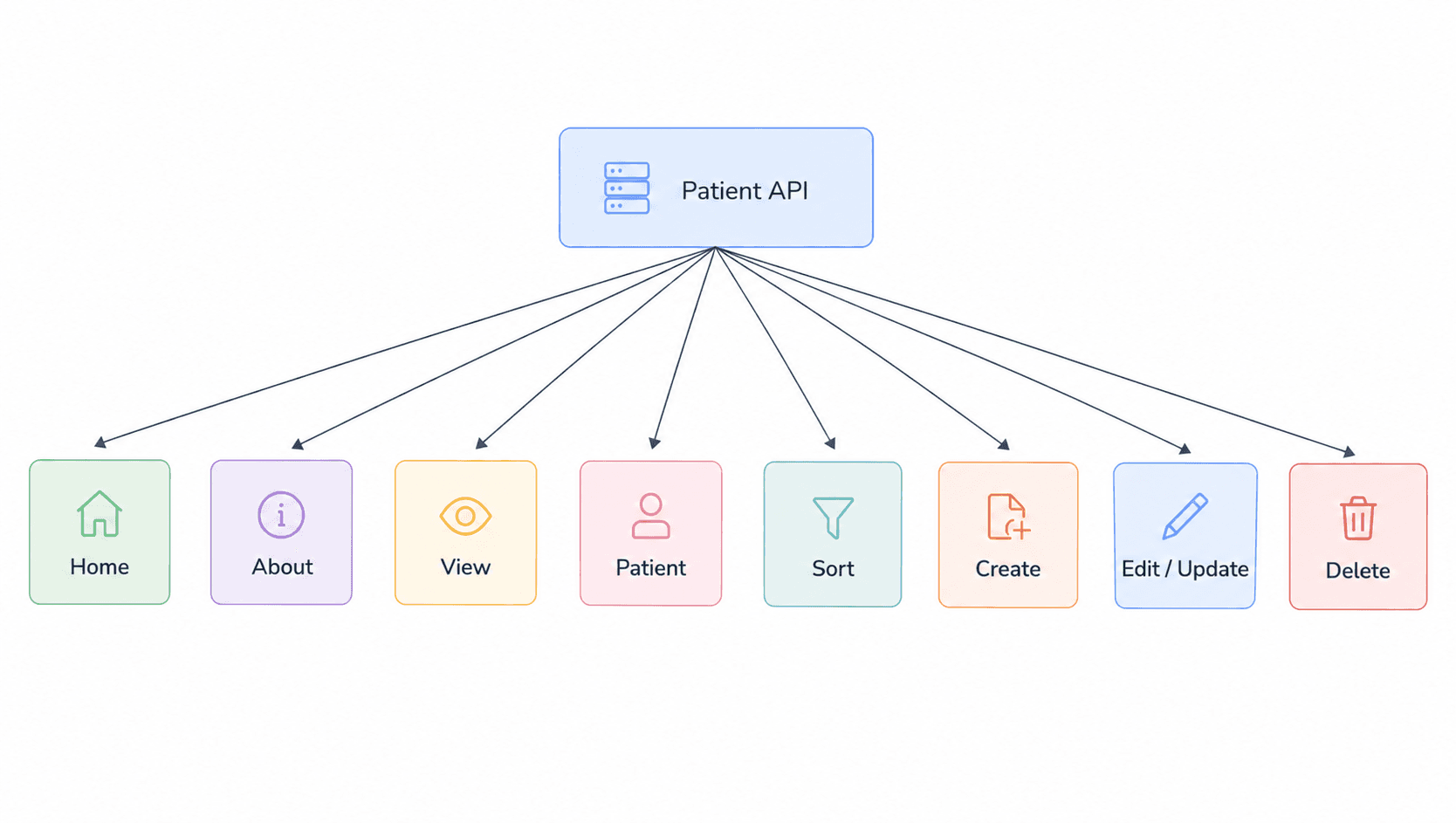
At this point, the Patient Management System supports the complete CRUD workflow.
The API now includes endpoints for:
- Home —
/ - About —
/about - View Patients —
/view - View a Specific Patient —
/patient/{patient_id} - Sort Patients —
/sort - Create a Patient —
/create - Update a Patient —
/edit/{patient_id} - Delete a Patient —
/delete/{patient_id}
The final project progress is shown below.
Key Takeaways
| Concept | Summary |
|---|---|
| PUT Requests | Use PUT to update an existing resource in an API. |
| PatientUpdate Model | A separate Pydantic model allows clients to provide only the fields they want to update. |
| Partial Updates | model_dump(exclude_unset=True) helps identify only the fields provided in the request. |
| Data Validation | The updated patient data is validated again through the Patient model before being saved. |
| Computed Fields | Recreating the Patient model ensures computed values such as BMI and verdict are recalculated after an update. |
| DELETE Requests | Use DELETE to remove an existing resource. |
| Error Handling | HTTPException is used to return a 404 Not Found response when a patient does not exist. |
| CRUD Operations | With GET, POST, PUT, and DELETE, the Patient Management System now supports the complete CRUD workflow. |
Conclusion
With the addition of PUT and DELETE requests, our Patient Management System now supports the complete CRUD workflow.
The PUT endpoint allows clients to update existing patient records while validating the updated data and recalculating computed fields such as BMI and verdict. The DELETE endpoint removes existing patient records and handles cases where the requested patient does not exist.
Together with the GET and POST endpoints covered in the previous parts, we now have a complete API flow:
Create → Read → Update → Delete
This gives us a solid foundation for building more advanced FastAPI applications and, eventually, exposing machine learning models through APIs.
What’s Next?
Now that we have completed the core CRUD operations in FastAPI, the next step is to connect FastAPI with a machine learning model and use it to serve real-time predictions.
In the next part, we’ll build an Insurance Premium Prediction API using FastAPI and a trained machine learning model.
You’ll learn:
- Building a Machine Learning Model: How to build an Insurance Premium Prediction model using a Random Forest Classifier.
- Feature Engineering: How features such as BMI, Age Group, Lifestyle Risk, and City Tier can be derived from user input.
- Exporting the Model: How to save the trained model as a
.pklfile and load it inside a FastAPI application. - ML Prediction Endpoint: How to create a
POST /predictendpoint that accepts user data and generates predictions. - Pydantic Validation: How Pydantic models validate incoming data and help prepare the features required by the ML model.
- Computed Fields: How FastAPI can dynamically calculate features such as BMI, lifestyle risk, age group, and city tier before prediction.
- Frontend Integration: How to connect the FastAPI prediction endpoint with a Streamlit interface and display the predicted insurance premium category.
By the end of the next part, we’ll have a complete flow:
Machine Learning Model → FastAPI → Prediction API → Streamlit Frontend
Series: FastAPI for Machine Learning — Part 7 of 12